13 minutes
Cutting Business Costs as Engineers

Foreword
Cutting costs has always been and remains to be one of the hot topics in all sorts of businesses and as engineers, we tend to feel constrained or limited by it.
- You wanna have that cool new piece of technology? Seriously? Too expensive in this market.
- How about that hardware that the business needs to continue operating? Tell the vendor to give it for free or we look for alternatives.
We cannot do much about some of these but on the other hand, we can use our engineering skills to save some money for the companies that are benefitting from our professional services or even for ourselves.
In this post I will provide an example for both scenarios:
- Saving tens of thousands of euros monthly on our observability stack without no compromise
- Saving money on the tiny server hosting this very blog
These topics can naturally become very long and technical if we want to cover each and every option, but here they are simplified a bit more for the sake of getting the message across.
Saving Tens of Thousands of Euros Monthly on Our Observability Stack
We utilize the TIG stack (Telegraf, InfluxDB, Grafana) as our observability platform to receive model-driven telemetry data from our network devices.
Model-driven telemetry (MDT) can either continuously or at specific intervals, provide pretty much any kind of information about a network device. For instance a familiar and important one is interface details like link status, errors, discards, etc.
In reality, we utilize and care about some, and not all of the ports on a switch. What does that mean?
Imagine that we have a 48-port core switch that we would want to observe. This core switch has four uplinks and four downlinks, so in total we just need eight out of 48 links to be observed/monitored.
Oddly enough, our network vendor does not provide a mechanism for us to configure and only get the interface information that we are interested in; instead, we receive the information for every single port on a device.
By now, you might have an idea where we are heading.
Based on my calculations the telemetry data size for a single interface is a tad bit over 5KBs whereas the size including all 48 physical and some virtual interfaces is around 300KBs.
These are really tiny numbers with today’s standards but soon I will demonstrate how they add up very quickly.
Calculating The Storage Requirements
Following the discussed scenario, let’s compare receiving this MDT data for 8 vs 48 interfaces on 1 and 5 second intervals and calculate the storage we need to keep the data for an hour vs a day vs a month:
Here are the numbers when we deal with just one device:
| Interval | Duration | 8 interfaces | 48 interfaces |
|---|---|---|---|
| 1 sec | 1 hour | 144 MB | 1.08 GB |
| 5 sec | 1 hour | 28.8 MB | 216 MB |
| 1 sec | 24 hours | 3.46 GB | 25.92 GB |
| 5 sec | 24 hours | 691.2 MB | 5.18 GB |
| 1 sec | 30 days | 103.68 GB | 777.6 GB |
| 5 sec | 30 days | 20.74 GB | 155.52 GB |
How about when we have a 1,000 devices?
| Interval | Duration | 8 interfaces | 48 interfaces |
|---|---|---|---|
| 1 sec | 1 hour | 144 GB | 1.08 TB |
| 5 sec | 1 hour | 28.8 GB | 216 GB |
| 1 sec | 24 hours | 3.46 TB | 25.92 TB |
| 5 sec | 24 hours | 691.2 GB | 5.18 TB |
| 1 sec | 30 days | 103.68 TB | 777.6 TB |
| 5 sec | 30 days | 20.74 TB | 155.52 TB |
Storing data for a thousand devices every 5 seconds over a month requires 7.5 times (87% more) disk space when using 48 ports (155.52 TB) instead of 8 ports (20.74 TB). That is a significant increase in storage costs.
Luckily databases use compression and other clever techniques to reduce the size of the data being stored, making these calculations an estimate. Nonetheless, I hope you get the big picture.
We merely looked at the interface data here, whereas in reality you would deal with physical resource utilization, routing tables, protocols and much more.
If you have read my previous posts, you know that in my current company we deal with over 14 thousand devices, so naturally these numbers multiply and grow much bigger.
The Costs
Now, there are two costs here:
- The obvious storage costs
- The engineering costs
Let’s quickly expand them.
The Obvious Storage Costs
The price of managing and storing this amount of data on-prem really varies from organization to organization and since many companies have or are moving to the cloud, why not look at one of the major players like Azure that has a price calculator?
Doing a quick search suggests that Azure Storage Blob seems to be what we need to store our data.
Disclaimer: I am no expert in cloud and these numbers are estimates purely based on my own calculations and reading up on the available resources. Also, by no means am I picking on Azure.
Storing the data for a year in the West Europe region using Zone-Redundant Storage yields these numbers:
- For 2.74 TB (filtered data) we pay $5,861.64
- and for 155.52 TB (original data) we pay $42,786.72
There are also some other hidden costs here. For instance, write and read operations, data transfers and various high-availability modes to name a few. Those will keep adding up to your bill.
I think the biggest difference here is when you present the second bill as opposed to the first one to the business and watch them spit their coffee out and start punching the air (and hopefully not you).
The Engineering Costs
The other cost which is often overlooked is the engineering one. Whether you store your data on-prem or in the cloud, it is for the sake of processing it, say, feeding it into your automation systems that act on certain events, visualizing it in dashboards so that network engineers can observe and react to events, or do better resource planning and distribution.
The bigger the size of your data, the more horse power and time is needed to process it. You would require more machines to crunch these numbers, you need to employ numerous load-balancing techniques at various levels to distribute the data which results in more engineering time to tackle all this data volume.
After all, nobody wants to pay all this money and put in the effort just to sit there and look at dashboards that are taking ages to load or even worse, constantly time out.
Simply put, throwing money at a problem does not guarantee the perfect outcome. Every decision that needs to be taken at a certain scale needs thoughtful calculations, both engineering and monetary-wise.
The Solution
Avid readers of this blog know that I have grown fond of writing middlewares, and as it turns out, this challenge can be solved by yet another one as well.
The solution is pretty straightforward. We need a program to sit in between the network devices and Telegraf to process the incoming gRPC messages, remove the data we do not need (can optionally enrich or transform the data as well), and pass it onto Telegraf for the rest of the shebang:
When it comes to solving these challenges, one of the fun things for me (is my age showing?) is choosing the right programming language, aka tool, for the task at hand since you need to factor in performance and dev-time/productivity and earnestly speaking, if Telegraf which is written in Golang can handle all this load, we can trust it. As a cherry on top most of the decoding logic is also there, which we can peek into and borrow some of it. So, a win-win situation.
Some might wonder how we determine which interfaces need to be filtered out?
Well, whenever our engineers want to onboard a new device (works on existing devices too), they have to go through our single source of truth (SSoT) platform and in there, via an onboarding job, they can tag the critical/important interfaces that need to be observed. Anything else will be filtered.
Our gRPC middleware has an agent (goroutine) that constantly queries the SSoT for interfaces that need to be observed with their corresponding devices and passes that information to the filtering agent (another goroutine), which in turn, takes care of the rest.
This way, we do not need to touch our configuration templates, and also there is no need to go back and forth with 3rd-party vendors that provide us their device telemetry data too.
Alright, I hope this section was concise enough.
Saving Money on The Server Hosting This Blog
Apart from my ever-dwindling free time, this blog also runs on a server to host its contents. As a personal challenge, both technically and to my bank account, I have decided to use the smallest server I could find with this spec:
- a shared 1.8 GHz single core CPU
- 512 MB of memory
- and 12 GB of disk space
Using a program that I have written called nginwho, I keep track of the visitors, their countries, the popularity of my posts and a fun one, the methods that bad actors use to exploit sites.
Everything was fine and dandy until after 8 months of running nginwho I noticed a pretty bad slowness around 10~30 seconds and a 100% CPU utilization whenever I was querying the database with specific questions that would also visibly delay the HTTP responses until the query ended. This was a bit annoying but not enough to allocate some serious time into fixing it.
The last straw was when one day I noticed that I was almost out of disk space and minutes away from dealing with an unresponsive server.
Ok, no more procrastination.
What Was The Issue?
Well, nginwho used to continuously parse nginx logs and after some tiny modifications would write them to a sqlite database. These logs in their default format look like this:
GOOD IP - - [25/Oct/2025:18:24:09 +0200] "GET /posts/bpf_flat_part1/ HTTP/2.0" 200 14812 "-" "Mozilla/5.0 (X11; Linux x86_64) AppleWebKit/537.36 (KHTML, like Gecko) obsidian/1.9.14 Chrome/138.0.7204.251 Electron/37.5.1 Safari/537.36"

GOOD IP - - [25/Oct/2025:18:30:04 +0200] "GET /posts/pushing_python_to_its_limits/ HTTP/2.0" 200 19188 "-" "Mozilla/5.0 (X11; Linux x86_64; rv:138.0) Gecko/20100101 Firefox/138.0"
You get the IP address, date and time as well as the method, requested URL and user-agent of the visitors.
At some point my posts started to attract quite a lot of viewers, especially when I was writing my eBPF series. That propelled this blog up in the search engines and with that came another issue that uncovered the inevitable a little sooner:
The bad actors and crawlers! The tireless machines that constantly look for “things”.
The volume of these logs was/is overwhelming, generating millions of database entries and resulting the database size to reach north of 10 GB in only 8 months!
What Was The Solution?
Looking at these logs, you can spot that a big chunk of them is just repeated text with tiny differences:
BAD IP1 - - [25/Oct/2025:07:25:08 +0200] "GET //test/wp-includes/wlwmanifest.xml HTTP/2.0" 403 548 "-" "Mozilla/5.0 (Windows NT 10.0; Win64; x64) AppleWebKit/537.36 (KHTML, like Gecko) Chrome/88.0.4240.193 Safari/537.36"
BAD IP2 - - [25/Oct/2025:07:25:08 +0200] "GET //wp2/wp-includes/wlwmanifest.xml HTTP/2.0" 403 548 "-" "Mozilla/5.0 (Windows NT 10.0; Win64; x64) AppleWebKit/537.36 (KHTML, like Gecko) Chrome/88.0.4240.193 Safari/537.36"
Here, apart from the IP addresses and the initial part of the URLs, everything else is identical. How can we store the exact same data and not pay the price?
The solution is actually pretty easy. We can restructure the way we store the data in our database.
Instead of having a single table that replicates the way nginx is writing its logs to a file, we can have multiple tables per each section of the log. For instance:
- A table to hold the IP addresses
- A table to hold the requested URLs
- A table to hold the user-agents
- etc…
- And a
maintable that has references to these other tables, resembling the original log
Now, we do not want to repeat the same mistake of storing identical data. Before writing an entry to a certain table, we check if that already exists and if so, we just increase its counter.
By the way, your database can do this automatically if you instruct it to. There is no need to write out the logic yourself.
Fun fact: A few weeks after implementing this, while I was telling about it to a friend of mine who happens to be a seasoned programmer, I learned that this is a known technique called database normalization.
The Result
A good test case was to migrate the existing data to the new schema. After doing that, the 10 GB database file reduced its size to just 10 MB. That is over a 1,000 times smaller.
What is the database size now?
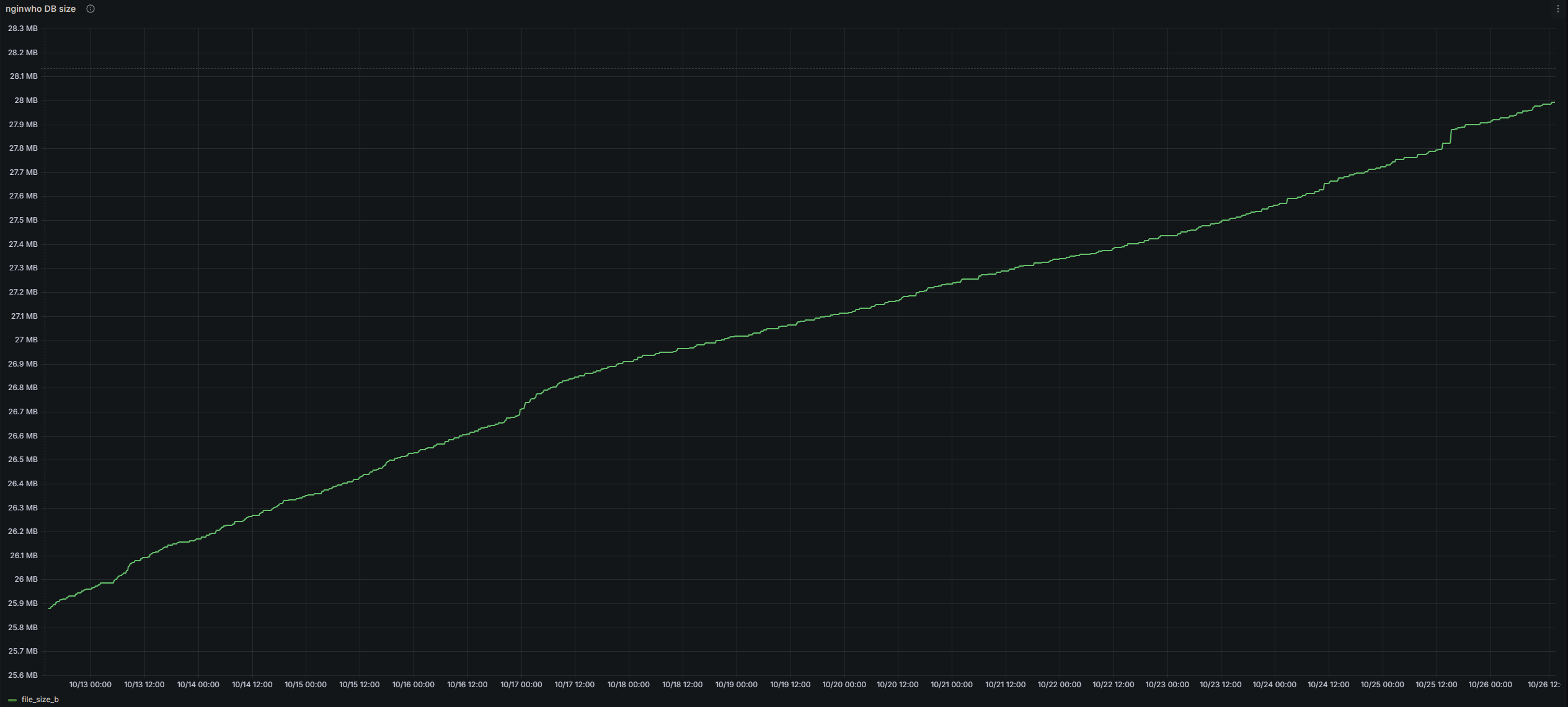
Just a tiny bit over 28 MB for the past three years up until now. You can right click and open the image in a new tab to view it better.
Mind you, on the quietest days, the blog serves thousands of requests from AI companies, crawlers, vulnerability scanners as well as legit users and these mean way too many logs for a personal project.
But what about the query performance and CPU utilization? The queries are super snappy and they do not cause CPU spikes when run. I call that a massive win.
What if I were to throw money at this problem? I could switch to a more powerful machine or could use a stronger database. The situation would definitely get much better, but those are just paper over the cracks.
These technical debts will catch up to you. There is no infinite compute and storage, at least not for us mere mortals.
Closing Words
I started writing this article with the intention of keeping it very short but it looks like I cannot write short posts.
Nonetheless, I hope I could convey the message that there are and will be times that this thing called money will come in between you and achieving greatness. By leveraging our engineering mindset and skills, we can either find or build a way to not only save money for our companies but also for ourselves while at the same time we can pick up and learn new skills.
Remember, throwing money at a problem or getting beefier machines is not always the answer. We should always take a step back and look at problems from a different angel.
Thanks for reading!